
Cleaning Operations CRM
A full solution design for a Salesforce-based cleaning operations system — covering personas, custom objects, process flows, automation, reporting, and security — built as a portfolio demo org.
“This solution design captures the full architecture of a Salesforce CRM for a small cleaning business — from the data model and object relationships through to automation flows, security design, and operational reporting. Built as a demo org to demonstrate Salesforce administration capability.”
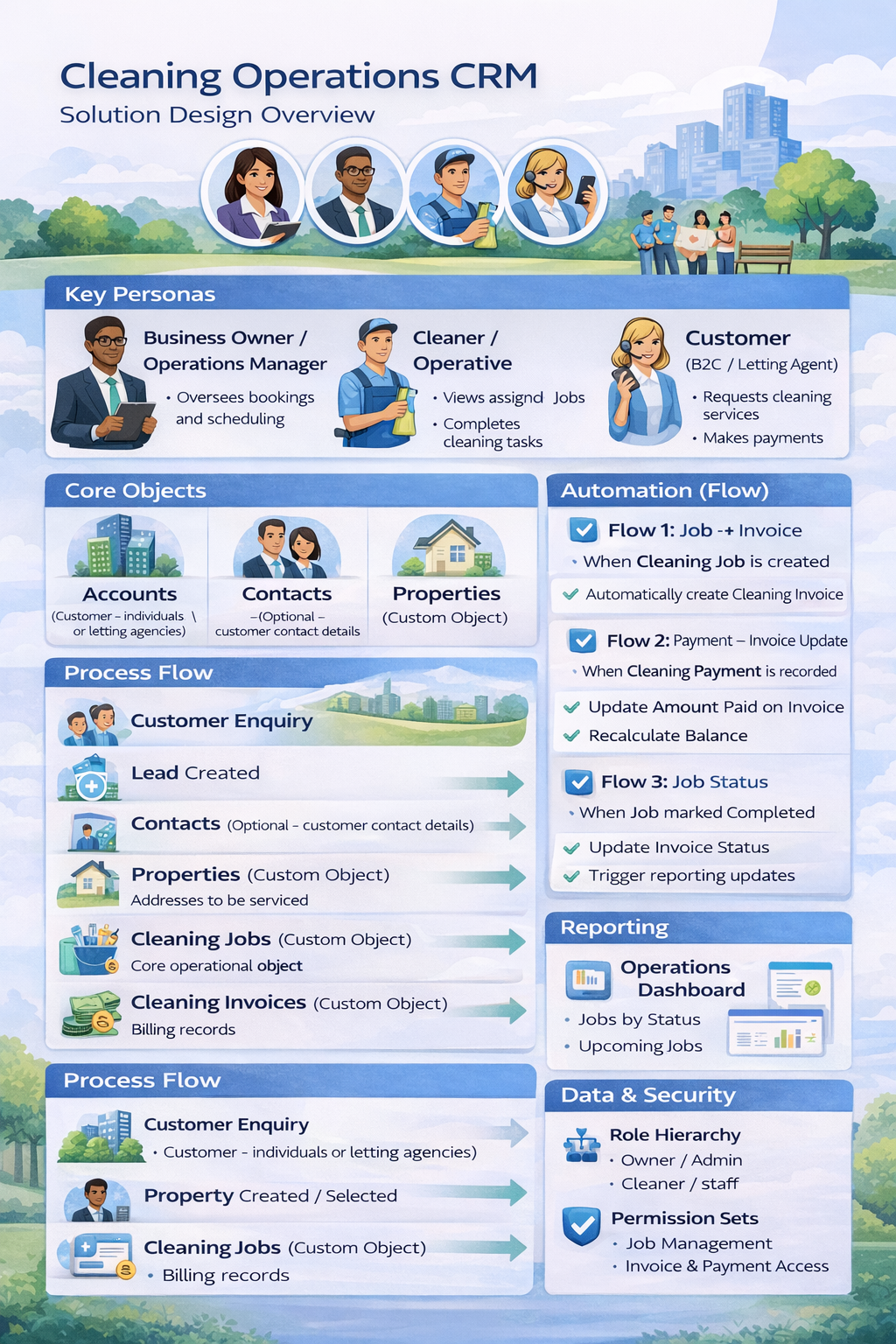
Solution Design Overview — Cleaning Operations CRM · Salesforce Demo Org
Key Personas
Three primary personas interact with the system, each with distinct responsibilities and access levels.
Business Owner / Operations Manager
- Manages bookings & scheduling
- Views dashboards & reports
- Tracks invoices & payments
- Full system access
Cleaner / Operative
- Views assigned jobs only
- Updates job status
- Completes cleaning tasks
- Restricted profile
Customer (B2C / Letting Agent)
- Requests cleaning services
- Tracked as Lead → Account
- Makes payments
- External to Salesforce
Core Objects & Data Model
The solution uses two standard Salesforce objects and four custom objects, designed to accurately represent the operational structure of a cleaning business.
| Object | Type | Purpose |
|---|---|---|
| Leads | Standard | Captures initial customer enquiries before qualification and conversion. |
| Accounts | Standard | Represents the customer — an individual homeowner or a letting agency. |
| Properties | Custom | Stores service addresses linked to an Account. Supports multiple properties per customer. |
| Cleaning Jobs | Custom | The core operational record — captures scheduled date, assigned cleaner, property, and job status. |
| Cleaning Invoices | Custom | Billing records auto-generated by Flow when a Cleaning Job is created. |
| Cleaning Payments | Custom | Payment records that automatically update the linked Invoice balance via Flow. |
🔗 Object Relationships
End-to-End Process Flow
The full journey from initial customer enquiry through to payment, as managed within the Salesforce org.
Automation (Salesforce Flows)
Three record-triggered Flows handle the core automation, eliminating manual data entry and keeping records consistent across the system.
- Automatically creates a linked Cleaning Invoice record
- Sets initial Invoice status to Unpaid
- Populates Invoice Amount from the Job record
- Zero manual steps required — billing is immediate
- Updates the Amount Paid field on the linked Invoice
- Recalculates the outstanding balance automatically
- Sets Invoice status to Paid when balance reaches zero
- Stamps the Completed Date field on the Job record
- Updates the linked Invoice status to reflect completion
- Triggers reporting dashboard refresh
Reporting & Dashboards
The Operations Dashboard provides real-time business visibility, replacing all manual reporting. The following report components are included.
Jobs by Status
Live count of Scheduled, In Progress, and Completed jobs — giving instant visibility of operational workload.
Upcoming Jobs
Jobs scheduled in the next 30 days, grouped by assigned cleaner to show individual workload distribution.
Finance Overview
Outstanding invoices, total amounts due, and payments received — tracked by period for cash flow visibility.
Lead Pipeline
Enquiry volumes, lead source breakdown, and conversion rate from enquiry to paying customer.
Property Report
Active properties, jobs per property, and service frequency — useful for capacity planning.
Cleaner Performance
Jobs completed per cleaner, completion rates, and scheduling efficiency across the team.
Data & Security Model
Access is controlled through Salesforce’s layered security model — ensuring each user sees only what is relevant to their role, with financial data restricted to management only.
Role Hierarchy
- Owner / Admin (full visibility)
- Operations Manager
- Cleaner / Staff (own records only)
Profiles
- System Administrator
- Standard Platform User
- Custom Cleaner Profile
Permission Sets
- Job Management
- Invoice & Payment Access
- Read-Only Reporting
Page Layouts
- Tailored per object & role
- Role-appropriate field visibility
- Custom Lightning App nav
Key Design Decisions
The following decisions were made during the design phase — each one a deliberate choice that reflects real Salesforce best practice.
Properties as a Custom Object
Salesforce has no native Property object. A custom object was created to store service addresses, linked to Accounts via a lookup — supporting multiple properties per customer, which is essential for letting agencies managing multiple sites.
Automated Invoice Creation via Flow
A record-triggered Flow generates a Cleaning Invoice the moment a Job is saved. This eliminates billing gaps entirely — no reliance on a user remembering to create an invoice manually after a job is booked.
Payments as a Separate Child Object
Payments are stored as a custom object in a master-detail relationship with Invoices, rather than a simple field. This allows multiple part-payments per invoice — reflecting how cleaning businesses are actually paid in practice.
Master-Detail vs Lookup Relationships
Master-detail was chosen for Invoice → Payments (and Job → Invoice) to enable roll-up summary fields for balance calculation. Lookup relationships were used for Account and Property links to preserve records independently if a parent is deleted.
Restricted Cleaner Profile by Design
Cleaners are given a custom profile that limits access to their own assigned Jobs only — with no visibility of financial records, other customers, or management data. Security is built into the design, not applied as an afterthought.